New 300 Winchester Magnum factory-loaded cartridges by Lapua

All news

New 300 Winchester Magnum factory-loaded cartridges by Lapua

New .300 Winchester Magnum cartridges for hunters and target shooters For 2021, Lapua offers three new cartridges for .300 Winchester Magnum. The .300 Win Mag. is known for its extreme versatility and as such it’s a great cartridge option for hunters, target shooters, military and law enforcement departments alike. Lapua is happy to offer two new […]

New .300 Winchester Magnum cartridges for hunters and target shooters

For 2021, Lapua offers three new cartridges for .300 Winchester Magnum. The .300 Win Mag. is known for its extreme versatility and as such it’s a great cartridge option for hunters, target shooters, military and law enforcement departments alike. Lapua is happy to offer two new options for hunters and one for target shooters.

Hunting cartridges with significant stopping power

As the .300 Win Mag. is known for its accuracy, hunters have found the cartridge to be an effective all-around choice for various types of game and hunting conditions. Most firearms manufacturers chamber for this caliber and there are numerous rifle options to choose from. With the new .300 Win Mag. Lapua case we now also offer two new factory-loaded hunting cartridges:
  • .300 Win Mag. loaded with the 11,0 gram / 170 grain Naturalis bullet and
  • .300 Win Mag. loaded with the 12,0 gram / 185 grain SP MEGA bullet.
Both cartridges offer something for every hunter. A fan favorite for many years, the traditional MEGA is a lead core, mechanically bonded, soft point hunting projectile. The third generation Lapua Naturalis bullet with its special valve design offers a completely lead-free option with that perfect mushrooming effect. With muzzle velocities that enable extremely straight flight trajectories, these rounds are an obvious choice for long range hunting or for situations that demand significant stopping power.

Long range target accuracy with Lapua Scenar

For the demanding target shooters, long range enthusiasts and tactical units, Lapua offers the perfect cartridge option: the  .300 Win Mag. with the 12,0 g / 185 gr OTM Scenar bullet. This round offers accuracy and power well beyond 1,000 meters/yards with the Scenar projectile staying supersonic. The unique design of the 185 grain Scenar (GB432) together with the short case neck and relatively short C.I.P cartridge specs create an undeniably powerful combination for long range target shooting. With a high quality powder and a muzzle velocity of 930 m/s or 3051 fps, this cartridge is destined to become the number one choice for any long range shooters demanding peak accuracy. All three Lapua cartridges will be hitting the markets in the spring of 2021. Go to the .300 Win Mag cartridge page for trajectory information here Back to News

Category

Hunting Products Sport shooting

News

Lapua Ballistics tips: How to export trajectory tables to excel

All news

Lapua Ballistics tips: How to export trajectory tables to excel

Lapua Ballistics tips: How to export trajectory tables to excel (For the previous Lapua Ballistics tips, click here for the Lapua Ballistics Tips page) A trajectory table in printed form can come in handy on many occasions, eg. when hunting or if you want to compare trajectory data on your computer. With Lapua Ballistics, you can […]

Lapua Ballistics tips: How to export trajectory tables to excel

(For the previous Lapua Ballistics tips, click here for the Lapua Ballistics Tips page)

A trajectory table in printed form can come in handy on many occasions, eg. when hunting or if you want to compare trajectory data on your computer. With Lapua Ballistics, you can export trajectory tables in a printable format. In this tip, we will tell you how to generate a table and export it to Excel.

A few tips for exporting a trajectory table to Excel:

  • Consider the distances for which you want to create a trajectory table. We recommend creating a table including only the necessary data.
  • Select the cartridge profile you are using.
  • Update the weather conditions to match the conditions for which you want to generate the table.
  • The trajectory table exported to Excel contains all the calculations made by Lapua Ballistics within the given distances. Note that your Excel views may look slightly different depending on version and operating system.
  • The exported Excel file contains a considerable amount of calculated data. The visuality of the table and how to display the information is up to the user.
  • NOTE! To be able to export the .csv file to your email, you need to have an email address registered to your phone’s own standard email app.

How to export trajectory tables to excel in Lapua Ballistics, step-by-step instruction

Step 1: Choosing the data you want to export

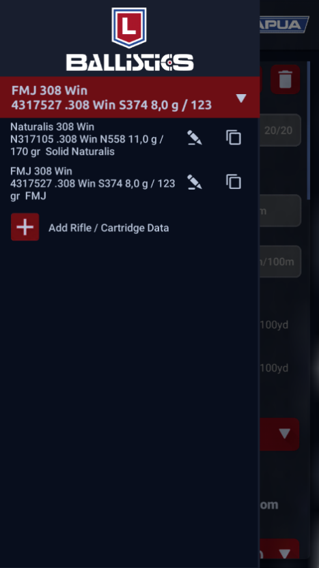
  • First, pick the weapon/cartridge combo you want to use.  In this example, we’re exporting a trajectory table for the profile FMJ 308 Win.
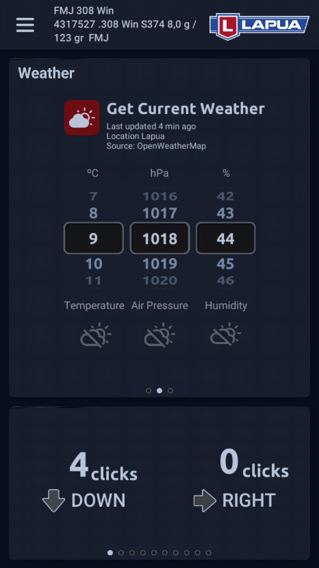
  • Next, since you’re going to be taking into account the expected weather conditions, go to the Calculator view and tap “Get current weather”
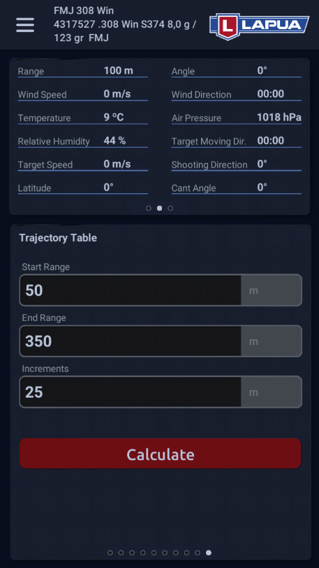
  • You know that the shortest possible shooting distance is 50 meters and the longest is 350 meters, and you want to generate a trajectory table in 25 meter increments. Swipe to the second to last calculator view “Trajectory table” and add the said distances. Tap “Calculate”.
Lapua Ballistics tips export to excel pic 1
Tap to view in full size
Lapua Ballistics tips export to excel pic 2
Tap to view in full size
Lapua Ballistics tips export to excel pic 3
Tap to view in full size

Step 2: Share the trajectory table to your registered email

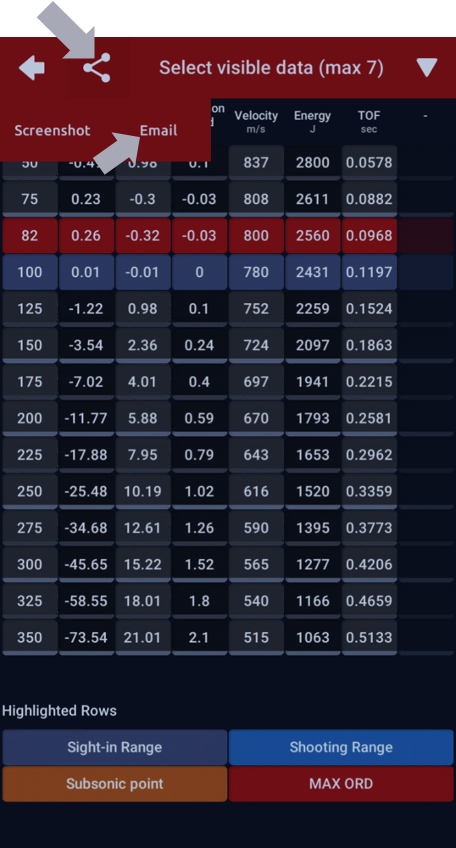
  • The flight path table calculated on the basis of the previously provided data looks like the enclosed image.
  • To export the trajectory table to Excel you need to share it to your own e-mail. First tap the “Share” symbol at the top and then tap ‘Email’.
  • The Ballistics app should now open the phone’s email app with the table enclosed as a .csv file. Next, send the email to the preferred address (e.g. to yourself).
  • NOTE! To be able to export the .csv file to your email, you need to have your phone’s own standard email app in use.
Lapua Ballistics tips export data to excel pic 4
Tap to view in full size

Step 3: Export the trajectory table from your email to your computer and open in Excel

Next, save the LapuaBallistics.csv file from your email to your own computer to a folder of your choice.
Lapua Ballistics tips export data to excel pic 5
Tap to view in full size
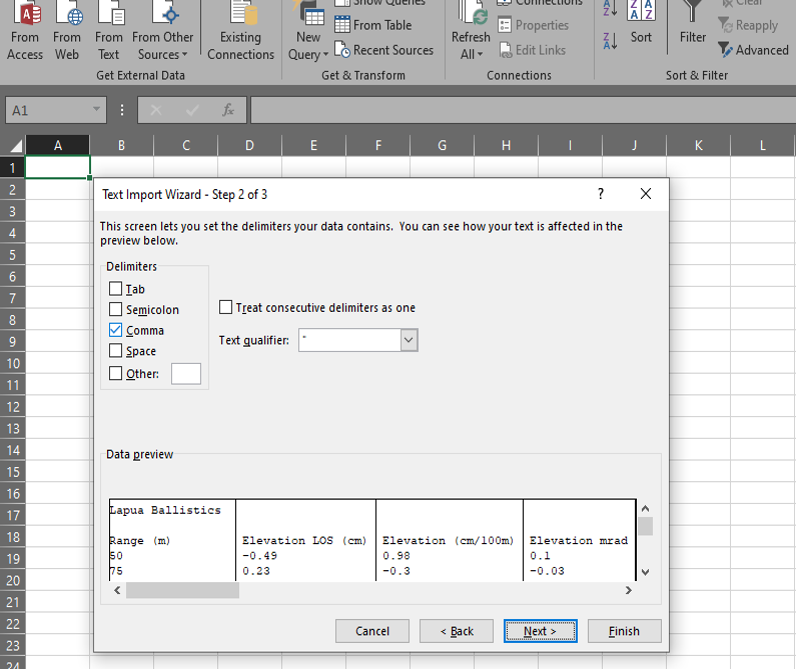
After that, open an empty workbook in Excel, and in the toolbar go to Data (→ Get External Data) → From Text. Choose the LapuaBallistics.csv file from the location you saved it to on your computer. Excel now opens the Text Import Wizard. Click Next, which takes you to Step 2 of 3. Choose ’Comma’ as your delimiter → click Next → Finish.
Lapua Ballistics tips export data to excel pic 6
Tap to view in full size
After this, your Lapua Ballistics calculation with the given distances will open in Excel. The trajectory table is at the top of the table, other properties can be seen at the bottom. You can pick the information you want and display it in the way you prefer.
Lapua Ballistics tips export data to excel pic 7
Tap to view in full size
  …And you’re done! Our next tip will feature the use of stability estimation. Stay tuned! Go to Lapua Ballistics main page Back to news and updates

Category

Products

News

Lapua Ballistics tips: How to compare data in Lapua Ballistics

All news

Lapua Ballistics tips: How to compare data in Lapua Ballistics

Lapua Ballistics tips: How to compare data in Lapua Ballistics (For the previous Lapua Ballistics tips go to the Lapua Ballistics Tips page) Lapua Ballistics offers you the opportunity to compare data for three different cartridges or bullets in the ballistic calculator. You can use comparison data for your cartridges or bullets, for example to compare trajectories […]

Lapua Ballistics tips: How to compare data in Lapua Ballistics

(For the previous Lapua Ballistics tips go to the Lapua Ballistics Tips page) Lapua Ballistics offers you the opportunity to compare data for three different cartridges or bullets in the ballistic calculator. You can use comparison data for your cartridges or bullets, for example to compare trajectories or impact velocity and / or impact energy in different hunting situations. You can also use the cartridge/projectile comparison to determine the best Point-blank Range (PBR) and to estimate stability. In addition, you can share the picture and information via email or other possible communication applications on your phone. You can easily compare data in the Ballistics app for the following ballistics calculation features: – Elevation – Windage – Velocity – Energy – Point-blank Range – Trajectory – Velocity / distance – Energy / distance – Stability estimation

How to compare data in Lapua Ballistics, step-by-step instruction

All these features are accessible in the lower views of the Calculator mode in the Ballistics app. In the comparison created, you can clearly see the differences between the 3 bullets / cartridges you have chosen in the same graphic.
    1. First, select the first Lapua cartridge from the Rifle / Cartridge Data menu, and check that the basic settings are correct. For example, you can set the desired muzzle velocity for the cartridge / bullet.
    2. Next, go to the Calculation mode, and swipe to the third lower view and tap to expand.
    3. Select as comparison item(s) either a custom cartridge you’ve created, or a factory-loaded Lapua cartridge from the drop-down menu. You can compare up to three items.
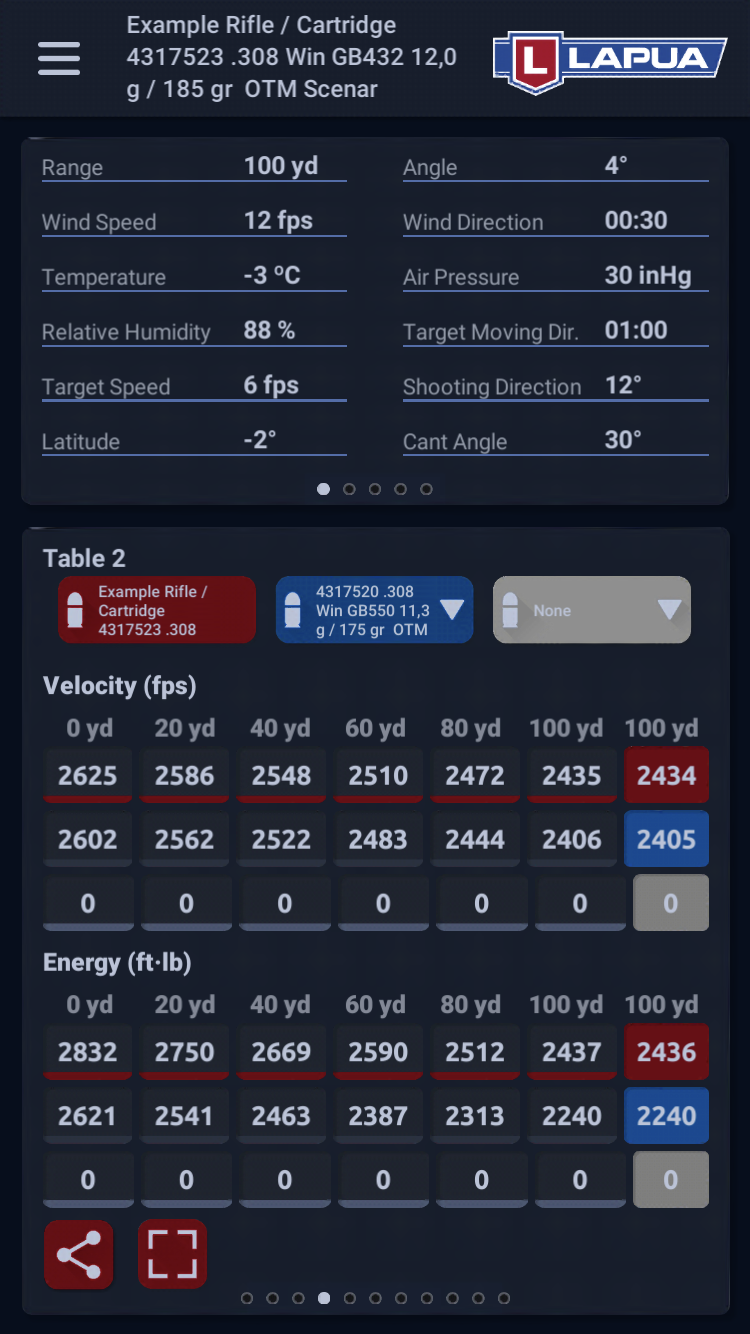
    4. Expand the lower view of the Calculator screen and swipe right to quickly and easily view the comparison data separated by different colors (here in red and blue).
Lapua Ballistics Cartridge settings view
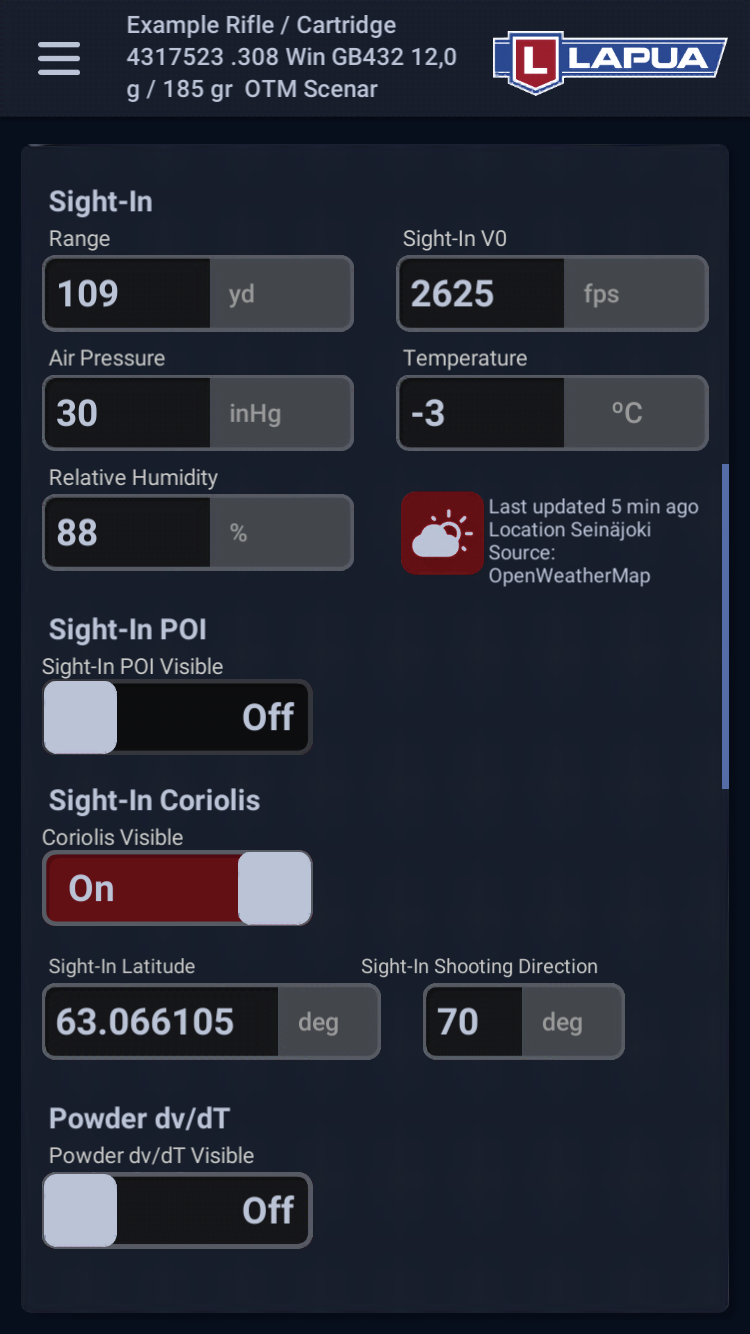
Step 1. Go to cartridge settings and set eg. muzzle velocity (Sight-In V0 value) and other basic values for your cartridge/bullet of choice. (Tap image to expand.)
Lapua Ballistics expand lower view to compare cartridges
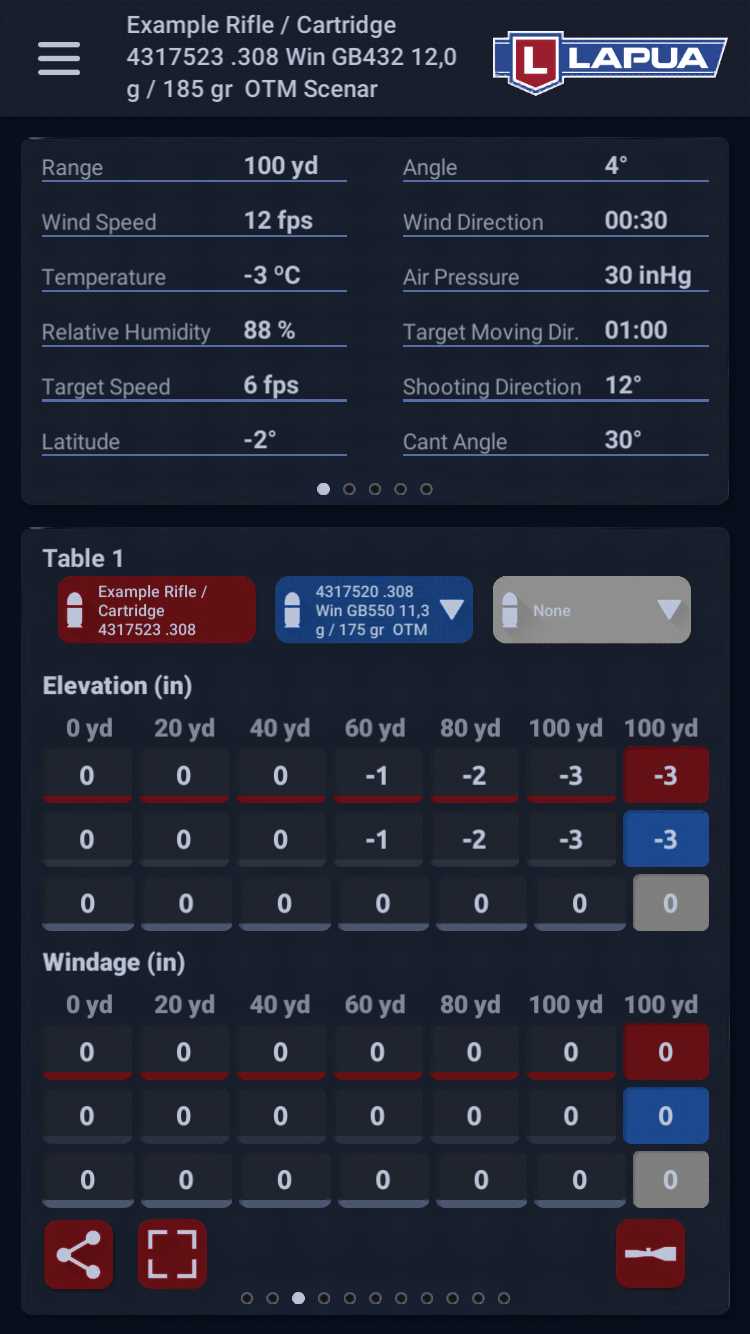
Steps 2 and 3. Open the Calculator and swipe to the third lower view and tap to expand. Choose the cartridges / bullets you want to compare. (Tap image to expand.)
Lapua Ballistics view lower views to compare data.
Step 4. Swipe right in the expanded view to quickly and easily view the comparison data separated by different colors. (Tap image to expand.)
You can also pick just one cartridge / bullet and compare different muzzle velocities, weather conditions and twist rates for that cartridge by copying it in the Manage Rifle/ Cartridge Data menu and changing the desired settings for the copied items.Next time, we’ll look at how to export trajectory tables to excel!
Go to Lapua Ballistics main page Back to news and updates

Category

Products

News

New Open Tip bullets and factory-loaded cartridges by Lapua

All news

New Open Tip bullets and factory-loaded cartridges by Lapua

New Open Tip bullets and factory-loaded cartridges by Lapua For 2021, Lapua offers new Open Tip (OT) bullets and factory-loaded cartridges for target and hunting practice: Introducing the 8 mm OT bullet and 8×57 IS OT cartridge, and the 9.3mm OT bullet and 9.3×62 OT cartridge. The 8×57 IS has earned a strong hunting reputation […]

New Open Tip bullets and factory-loaded cartridges by Lapua

For 2021, Lapua offers new Open Tip (OT) bullets and factory-loaded cartridges for target and hunting practice: Introducing the 8 mm OT bullet and 8×57 IS OT cartridge, and the 9.3mm OT bullet and 9.3×62 OT cartridge. The 8×57 IS has earned a strong hunting reputation in recent years, but is now taking a step in the target shooting direction. Lapua Sales Manager, Erkki Seikkula, explains the thought process behind our new 8mm 7,8 g/ 120 grain OT bullet: “We designed an easy and softly firing bullet that meets Lapua’s strict accuracy requirements. The precision of this bullet offers shooters the opportunity to practice with the same rifle that they hunt with. For avid hunters that enjoy target competitions, the performance of this projectile can really make a difference.” A notable advantage of the bullet and the factory-loaded cartridge is that the bullet’s point of impact coincides with the Lapua Naturalis, making both products ideal for hunting practice. The 9.3×62 has traditionally been used only with big game hunting in mind. Requirements have changed with time and today this rifle cartridge needs a bullet that offers a more diverse use of the caliber amongst hunters. Lapua has answered this demand and developed the world’s most accurate Open Tip bullet for this caliber, which extends its use to a diverse set of options from practice shooting to small predator hunting. “The 9.3mm 12.0 g / 185 grain Open Tip bullet is available as a reloading bullet for home loaders, yet we also offer it as a factory-loaded cartridge for anyone for whom accuracy and performance matter when choosing a cartridge. Also here, the impact point of resembles that of the Naturalis bullet, making this the ultimate round for hunters training for big game hunts”, Seikkula says. As with all Lapua products, ballistic data and trajectory information will be published on our website, with load data available by Vihtavuori Powders. The new bullets and cartridges will be available in the beginning of 2021. Back to News

Category

Hunting Products Sport shooting

News

New Lapua Brass Cartridge Cases for 2021

All news

New Lapua Brass Cartridge Cases for 2021

  Lapua, world-renowned for producing the finest cartridge cases and ammunition products, is happy to announce the addition of 6.5 PRC, .284 Winchester, .300 Winchester Magnum, and .300 PRC cartridge cases to our 2021 product offering. Our new Lapua brass offerings for 2021 display our continued commitment to the precision shooting disciplines which are popular on […]

  Lapua, world-renowned for producing the finest cartridge cases and ammunition products, is happy to announce the addition of 6.5 PRC, .284 Winchester, .300 Winchester Magnum, and .300 PRC cartridge cases to our 2021 product offering. Our new Lapua brass offerings for 2021 display our continued commitment to the precision shooting disciplines which are popular on a global scale. New Lapua brass cartridge cases The new Lapua 6.5 and .300 PRC cartridge cases provide competitive shooters, hunters and accuracy enthusiasts a premium selection for precision hand loads, an option that’s been missing from the market since the PRC’s inception.

The 6.5 PRC case

Although the 6.5 Precision Rifle Cartridge (or PRC for short) was originally designed for long range hunting, the 6.5 PRC is still an excellent cartridge for both long range sport shooting and hunting. Its increased case capacity enables velocities up to 80 m/s (262 fps) faster than the 6.5 Creedmoor or 6,5×55 SE. By design, the cartridge features a longer throat enabling the use of today’s popular, high ballistic coefficient (BC) projectiles for long-range competitions. The 6.5 PRC case is a good match with relatively slow burning powder types. It is a great choice for heavy bullets, exceeding even 9,7 g / 150 grains with excellent retained energy and terminal performance for mid-sized and large game.

The .300 PRC case

The .300 PRC was designed for extreme long range shooting with heavy bullets featuring high ballistic coefficients. Its superior ballistics and beltless case configuration represent modern case design that supports the use of modern long and high BC bullets. With its ability to load heavier bullets, the performance of the .300 PRC exceeds the .300 Winchester Magnum and many other .30 Magnums on the market. The .300 PRC is also an superb choice in open and large hunting fields for long distance hunting of mid-to-large sized game with bullet weights exceeding 15,8 g / 245 grains.

The .284 Winchester case

The .284 Winchester cartridge has experienced a recent resurgence in F-Class competition, where shooters compete to distances out to 1,000 m/yd. Members of the US Rifle Team, which Lapua sponsors, will enjoy having cases readily available in this classic cartridge. The .284 Winchester’s rebated rim design enables a larger powder column, yet easily functions through medium length actions making it desirable for custom rifles. Its accuracy potential and high muzzle velocity is also recognized in hunting fields where this cartridge performs nicely on a very wide scale.

The .300 Winchester Magnum case

The .300 Winchester Magnum has been a staple within the firearms industry, widely used by hunters, target shooters, military and law enforcement agencies around the globe since its development in the early 60’s. It is still used for competitive target shooting, hunting, and Mil/LE platforms to-date. It delivers excellent long range performance with a wide range of bullet weights from 165 to 200 grains and more. The .300 Winchester Magnum has a great reputation as a .30 caliber magnum hunting cartridge in Europe and North America. Lapua’s .300 Win. Mag case will be a great addition to our line, especially with the huge bullet selection available for sport shooting and hunting for this caliber and all major rifle manufacturers chamber their rifles for it. All new Lapua cases will be available for home loaders in spring of 2021.

Category

Products

News

Lapua Ballistics tips: The benefits of 6DOF

All news

Lapua Ballistics tips: The benefits of 6DOF

Lapua Ballistics tips: The benefits of 6DOF (For the previous Lapua Ballistics tips go to the Lapua Ballistics page) As most Lapua Ballistics users already know, Lapua Ballistics applies the 6DOF calculation to model flight paths for Lapua projectiles. 6DOF is also the calculation model used by Lapua Product Development. So what are the advantages […]

Lapua Ballistics tips: The benefits of 6DOF

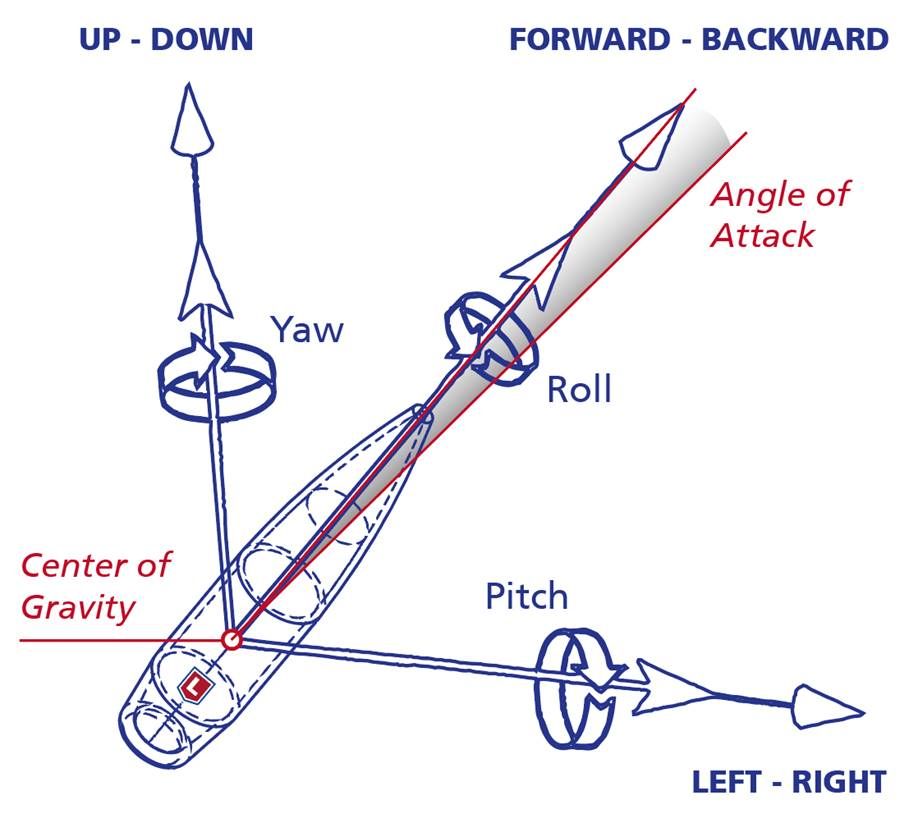
(For the previous Lapua Ballistics tips go to the Lapua Ballistics page) As most Lapua Ballistics users already know, Lapua Ballistics applies the 6DOF calculation to model flight paths for Lapua projectiles. 6DOF is also the calculation model used by Lapua Product Development. So what are the advantages of 6DOF, and what does it mean for a shooter requiring accuracy? First, let’s take a look at some other means of modelling flight paths: The 3DOF point-mass solution The 3DOF calculation model considers only the drag coefficient, i.e. the Cd factor. Using 3DOF doesn’t require a large computing capacity. As the name implies, there are three degrees of freedom, i.e. translational components tracked in the equation: moving forward/backward; moving left/right; and moving up/down. 3DOF calculation doesn’t take any stance on the attitude (the orientation of the projectile relative to the direction of motion) or stability of the bullet, and has a very straight-forward and simple approach to crosswind. This means that the 3DOF model calculates the position of the bullet as a function of time reasonably correctly as long as the flight is stable. In windy or changing conditions, however, this model is not the most reliable. The modified point-mass solution The modified point-mass calculation (sometimes referred to as 4DOF) is more advanced than the 3D model, as the calculation includes three translational degrees of freedom and one rotational degree of freedom (spinning). The aerodynamic model includes also e.g. the contribution of lift force. These are some of the same forces that the 6DOF model calculates, however the point-mass model applies a simplified calculation which does not take into account the actual attitude of the bullet, but merely includes an algebraic approximation for the attitude (pitch/yaw angles) of the projectile. Due to some simplifications involved the model is not able to give information concerning the flight stability. Why 6DOF? The above mentioned calculation solutions are obviously usable for trajectory calculation. So the question is, what does the Lapua Ballistics 6DOF solution offer? The easy answer is: the most accurate results. As with the modified point-mass model, the 6DOF calculation includes three translational degrees of freedom and three rotational degrees of freedom which give the position and attitude as a function of time. Simplified, 6DOF tracks both the pitch, yaw and roll as well as the up/down, left/right and forwards/backwards movement of the bullet. The big difference to the other calculation models is that the 6DOF models the actual trajectory path of the projectile at all times during flight, instead of just calculating points on the trajectory curve. The stability properties of the bullet are obtained during the trajectory integration since all the rotational degrees of freedom are present in simulations. Also, the stability analysis of the Lapua ballistics app is more advanced than most other calculators, as it considers both dynamic (Sd) and gyroscopic (Sg) stability factors, not only the latter as many other ballistic calculators do. The Sd is especially important in long range shooting for analyzing the transonic stability of the bullet. But how can the Lapua Ballistics app utilize 6DOF? It is after all a very complicated mass of data, something a mobile phone would not be able to calculate. The explanation lies in the background information of the app data. Every 6DOF-calculation is based on an aerodynamic values table that is calculated for every Lapua bullet. The table includes several aerodynamic coefficients and bullet specifics: Drag coefficient derived from Doppler radar data, Normal force coefficient slope, pitching moment coefficient slope, roll damping moment coefficient, two stability derivate, Magnus force coefficient slope and Magnus force moment. All those coefficients must be functions of the Mach number. These calculated values are taken into account for every Lapua bullet in the Lapua Ballistics app. This is also why we can’t provide the same level of accuracy for other bullets; utilizing 6DOF requires this background data. Accuracy comes down to not only data, but to weather, equipment, mental preparedness and so on.  The Lapua Ballistics app gives you the best data to take that perfect shot. The rest is up to you.

Category

Products

News

Lapua Ballistics update: organize lower views, add wind speed, Max range and Cant angle calculation plus new languages!

All news

Lapua Ballistics update: organize lower views, add wind speed, Max range and Cant angle calculation plus new languages!

New features and languages The Lapua Ballistics App has been updated! The update includes three new language options, French, Spanish and Afrikaans! To set your language of choice in the Ballistics app, go to Menu -> Set Units / Settings -> Language. Other new Lapua Ballistics app features include: Cant angle calculation To set the […]

New features and languages

The Lapua Ballistics App has been updated! The update includes three new language options, French, Spanish and Afrikaans! To set your language of choice in the Ballistics app, go to Menu -> Set Units / Settings -> Language.

Other new Lapua Ballistics app features include:

Cant angle calculation

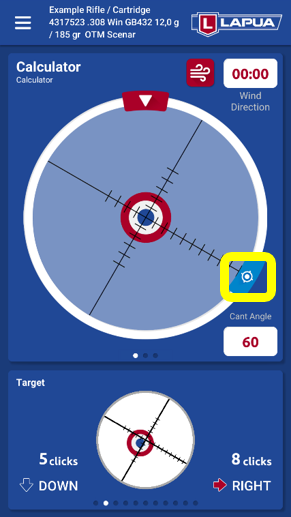
To set the feature (available for Lapua cartridges and bullets) go to Menu -> Calculate Cant Angle. The barrel acts as an axis point for the cant angle calculation.

Max Range analysis

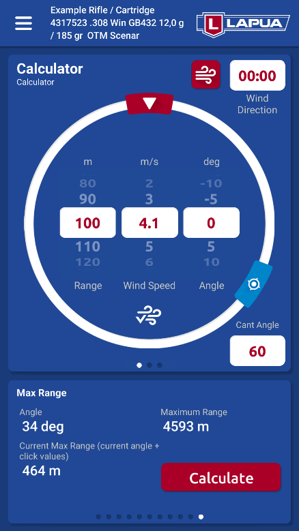
This feature (available for Lapua cartridges and bullets) shows the maximum range of a projectile for a shooting range defined by the user, and the calculation is based on the current given angle and click values. With this feature you can check the maximum range of a shot in case it would miss the target. To calculate Max range of a bullet with optimal angle: in calculator mode, go to the bottom panel and swipe to the last analysis view and press Calculate.

Add wind speed from the nearest weather station

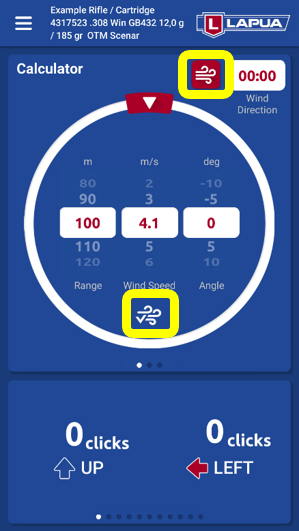
Add wind speed by pressing the red wind icon. The indicator icon (below the wind speed parameter) shows whether the value has been updated from a weather service or fed manually. Remember to set the wind direction yourself.

Organize your analysis views

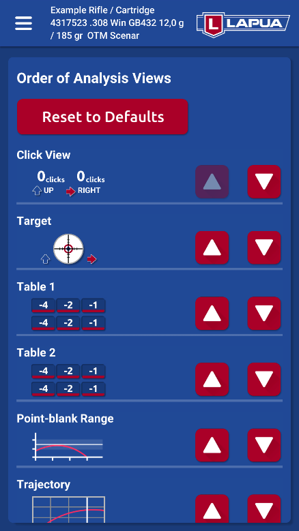
You can now freely organize the order of analysis views found in lower part of the calculator view. Also the analysis views can now be swiped as a continuing carousel for faster access of frequently needed views. To organize lower views, go to Menu -> Set Units / Settings -> Order of Analysis Views.

Category

Products

News

Ballistics App Tips: The Coriolis effect

All news

Ballistics App Tips: The Coriolis effect

This is brand new series of updates on our website: Lapua Ballistics app tips! Get the most out of our free of charge ballistics calculator by following our tips which we will be sharing all through year 2020. If you haven’t tried our app yet, download it and check out our guide for easy setup! Previously […]

This is brand new series of updates on our website: Lapua Ballistics app tips! Get the most out of our free of charge ballistics calculator by following our tips which we will be sharing all through year 2020. If you haven’t tried our app yet, download it and check out our guide for easy setup! Previously published tips in the series: Utilizing Point Blank Range and V0 or Muzzle velocity calculation The Sight-In POI feature Next tips featuring: Benefits of 6 DOF calculation and Trajectory calculation for bullets and cartridges

TIP: The Coriolis effect – what is Coriolis, and how does it affect shooting?

The Coriolis Effect describes the pattern of deflection taken by objects not firmly connected to the ground as they travel long distances around the Earth. The Coriolis Effect is caused by the fact that different parts of the Earth rotate at different speeds, i.e. the rotational speed is higher at the Equator compared to the poles. In shooting, the Coriolis Effect means in practice that the deviation of the trajectory of the bullet, i.e. the curvature, arises from the difference in rotational speed between the shooter and the target. Put simply, due to the rotational motion of the Earth, the target location moves at a different speed than the firing point during the flight of the bullet. This speed difference is affected by the location and direction of the firing point on the Earth, the firing distance, and the flight time of the bullet. The Earth rotates counterclockwise (as seen from the north), that is, from west to east. When shooting in the northern direction near the North Pole, the circumferential speed of the target is lower than the circumferential speed of the shooter standing south of the target, whereby the distance from the shooter to the axis of rotation of the Earth is greater than the distance of the target to the axis of rotation. Thus during the bullet’s flight, the target has turned less to the right compared to the shooter, and the bullet misses the target flying past it to the right. When shooting in the southern direction near the North Pole, the circumferential speed of the target is higher than the circumferential speed of the shooter. In this situation during the projectile’s flight, the target has turned more to the left than the shooter and the bullet again misses the target to the right.

At what shooting distances does Coriolis have an effect?

The effect of the Coriolis phenomenon can already be seen on medium firing distances, but it becomes an essential variable for the hit with shooting distances of 1,000 m/yds and beyond. The Coriolis phenomenon affects the flight of a bullet in the Northern Hemisphere so that when firing north or south, the bullet sways to the right and in the Southern Hemisphere to the left. The more your firing line is in the east-west direction, the less the effect of the Coriolis. The magnitude of the deviation depends on the location latitude and the flight time of the bullet. The maximum deviation is at the poles and the smallest at the Equator, because the difference in rotational speed between the shooter and the target is at maximum at the poles and zero when firing symmetrically over the Equator.

The Eötvös Effect

When shooting a bullet to the east or west, the Eötvös Effect also affects the flight. When a bullet is fired in the direction of rotation of the earth, i.e. to the east, the shots hit high. If the bullet is shot west, the shots hit low. The reason behind it is that when you’re firing east, in the direction of the Earth’s rotation, the target has time to move during the flight time below what the aiming point was, so the hit is at the top. When shooting west against the direction of the Earth’s rotation, the target has time to move higher than the aiming point during the flight, so the bullet hits low. The more your firing line is in the north-south direction, the less the effect of the Eötvos phenomenon. Often the Eötvös Effect is considered to be part of the Coriolis phenomenon, but it is in fact its own separate phenomenon. The Eötvös Effect is at its strongest at the Equator and at zero at the poles. The deviation caused by Coriolis and Eötvös effects are around +/- 10 cm / 3.9’’ at a distance of 1,000 m/yds.

Using Coriolis calculation in Lapua Ballistics

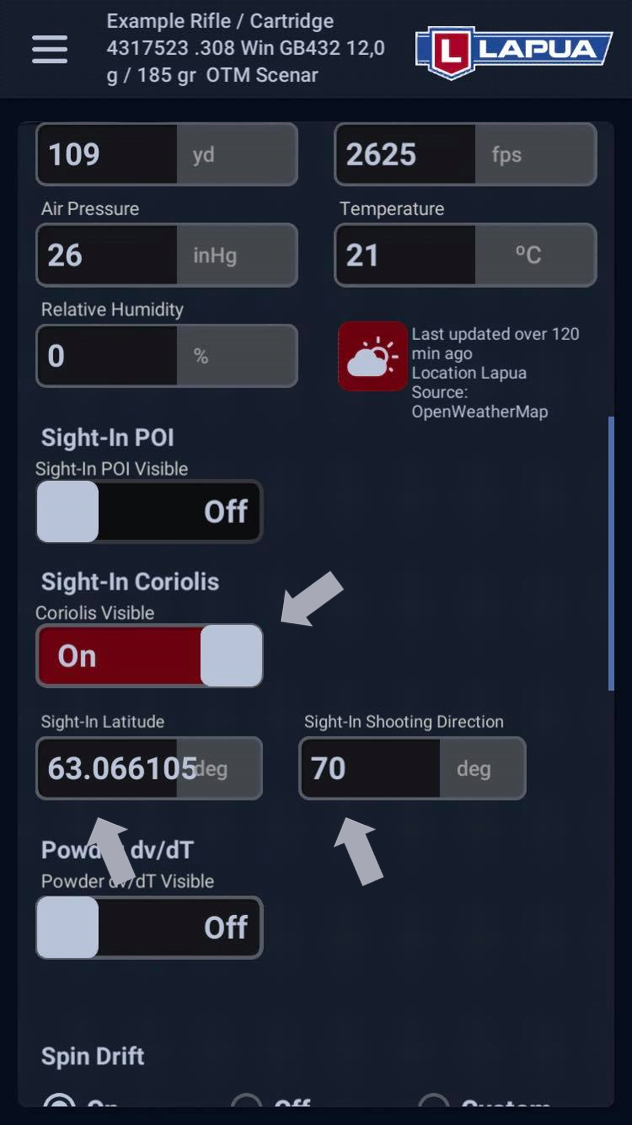
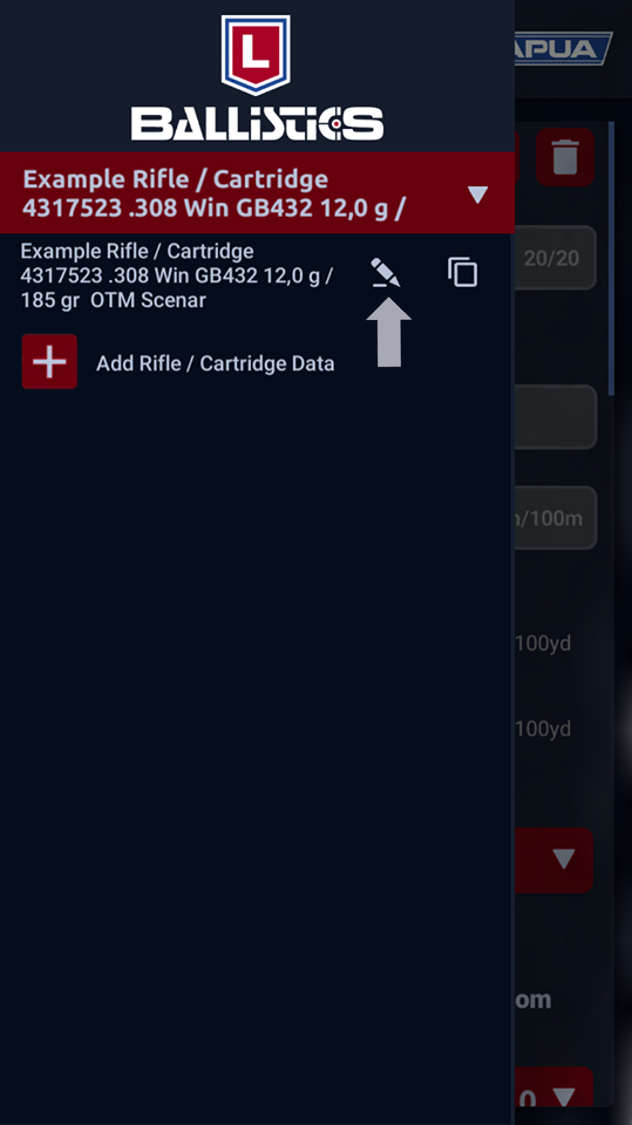
  • From the menu in the upper left corner of the screen, select “Manage Rifle / Cartridge Data” and from the drop-down menu, select the rifle / cartridge for which you want to enable Coriolis calculation. Scroll down to the Sight-In settings and set “Sight-In Coriolis” to On.
  • In the Sight-In Latitude window, set the latitude at which you have done the sighting-in, and in the window next to it, set the direction in which you’ve fired when sighting-in.You can easily check the latitude with Lapua Ballistics when you are at your shooting location, or from Google Maps by clicking on the location where you have done the sighting-in. Enter the value in the style of xx.xx.  From the same Google Maps view, you can also estimate the cardinal direction in degrees of your sight-in. North is 0˚, East is 90˚, South is 180˚ and West is 270˚. Naturally, you will get the exact value for the sight-in direction with a compass when you are at your firing point.Next, tap Save.
Lapua Ballistics Coriolis effect 1
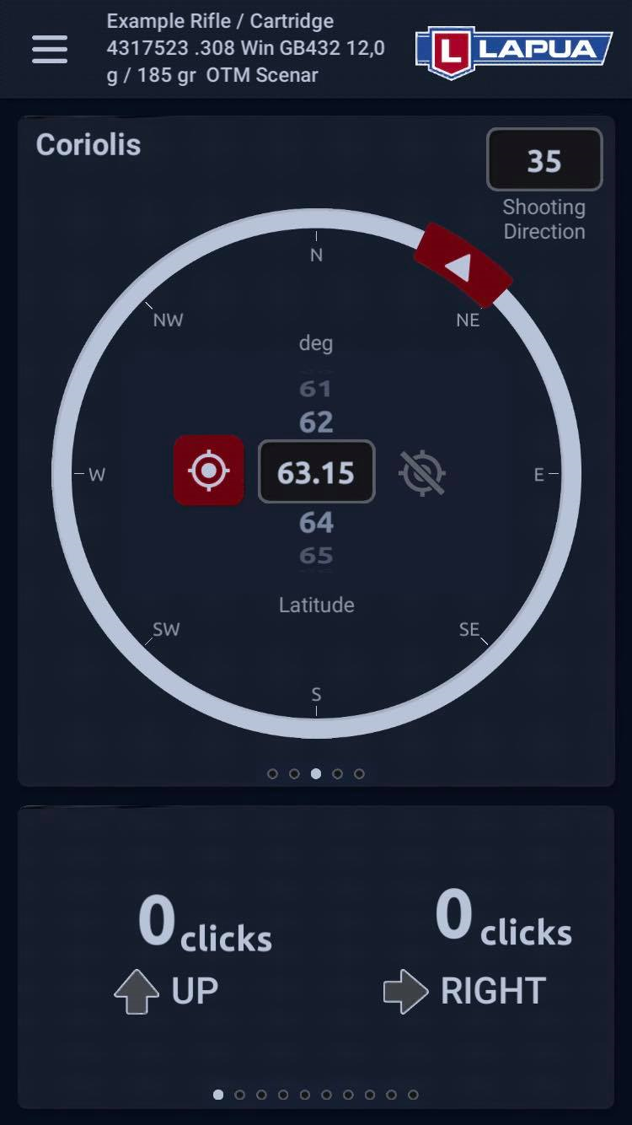
Coriolis in Calculator view Now that the basic settings are in order, you can use the app’s Coriolis calculation by swiping to the third upper window of the Calculator view.
  • By tapping the red icon in the middle of the screen, the system automatically sets the latitude you are currently at. You can also set the latitude manually by typing or selecting it from the scroller.
  • Next, set the shooting direction degrees in the top right corner of the upper window, or select the value by rotating the red arrow on the circle.
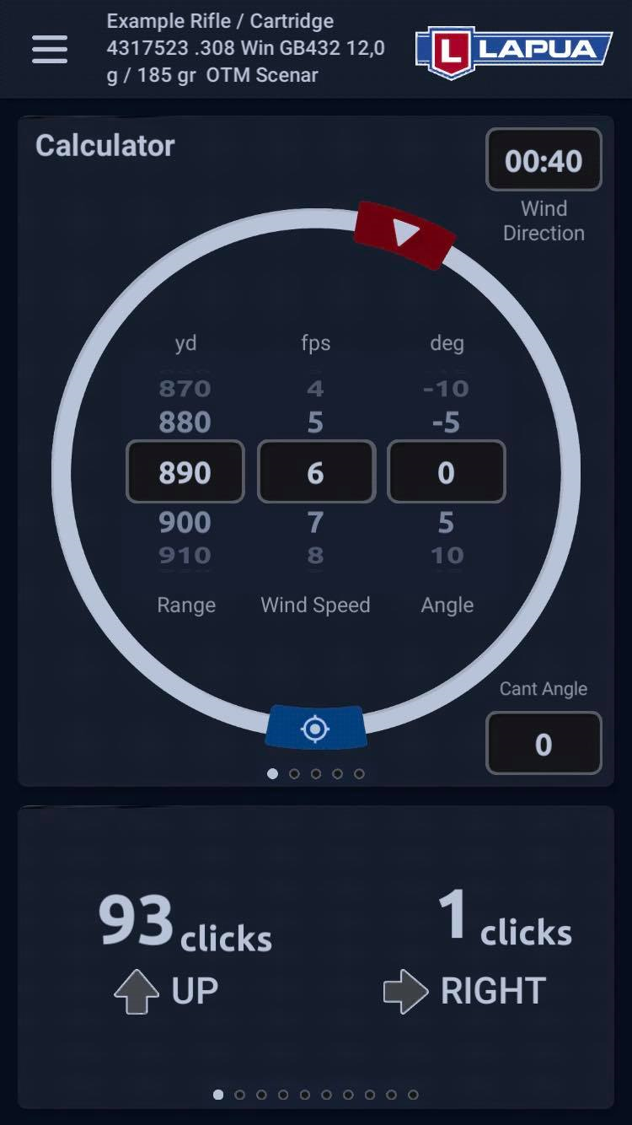
  • Once you have set all the other values ​​related to the calculation, swipe back to the first upper window and enter the shooting distance and wind values.
  • The app now automatically takes into account both the Coriolis Effect and the Eötvös Effect in the calculation.
However, also keep in mind that Spin drift also affects lateral movement at long distances and should also definitely be considered when shooting long distances. Spin drift is its own phenomenon independent of the Coriolis, which Lapua Ballistics takes into account in the calculation when you have it set to ‘On’ in the basic settings menu.
Lapua Ballistics Coriolis effect 3Lapua Ballistics Coriolis effect 4

Category

Products

News

Ballistics app tips: Sight-In POI

All news

Ballistics app tips: Sight-In POI

We are kicking off a brand new series on our website: Lapua Ballistics app tips! Get the most out of our free of charge ballistics calculator by following our tips which we will be sharing all through year 2020. Tips in the series: Utilizing Point Blank Range and V0 or Muzzle velocity calculation NEW: The Sight-In POI […]

We are kicking off a brand new series on our website: Lapua Ballistics app tips! Get the most out of our free of charge ballistics calculator by following our tips which we will be sharing all through year 2020.

Tips in the series:

Utilizing Point Blank Range and V0 or Muzzle velocity calculation NEW: The Sight-In POI feature Coming up next: Coriolis effect, Benefits of 6 DOF calculation and Trajectory calculation for bullets and cartridges

EASY APP SETUP: If you haven’t tried our app yet, download it and check out our guide for easy setup!

TIP: The Sight-In POI feature – how to use several cartridges in the same firearm

Sight-In POI is a tool that can be utilized when you need to use several different types of cartridges in the same firearm without changing the basic sight-in setup of the scope. Knowledge of how different types of cartridges behave in your own rifle extends, for instance, the practice season well into the hunting season, and it means you can use the appropriate ammunition in any situation without having to sight-in the firearm again. When using the Sight-In POI feature, several different cartridge variations can be built around the sight-in settings of the rifle’s primary cartridge, depending on what cartridge needs you have.

How to use the Sight-In POI feature in Lapua Ballistics:

  • Make sure you have set the reticle click units for your scope correctly in the app.
  • Select the rifle profile you want to use as your primary profile and primary cartridge and sight-in the rifle to suit it.
  • Copy the primary profile under another name (eg. Cartridge 2), select your preferred 2nd cartridge and set the correct muzzle velocity for it
  • Test shoot the 2nd cartridge at your preferred distance without changing the scope settings.
  • After test shooting, measure the distance (height and width) between the hits of the shot group and the point of aim, and calculate how many scope clicks this difference corresponds to.
  • Alternatively, you can determine the corrections by re-sighting the rifle with the 2nd cartridge. When choosing this option we recommend zeroing the turrets for the primary profile. Next, carefully calculate the needed number of clicks for Cartridge 2. Once you have the number of clicks add them to the Sight-In POI Elevation and Windage windows of your Cartridge 2 profile.
  • Enter a positive number if the 2nd cartridge hits above or to the right of the point of aim, and a negative number if it hits below or to the left.
  • Similarly, you can also set the click corrections for your 3rd cartridge etc.

EXAMPLE: Sighting in a FMJ cartridge

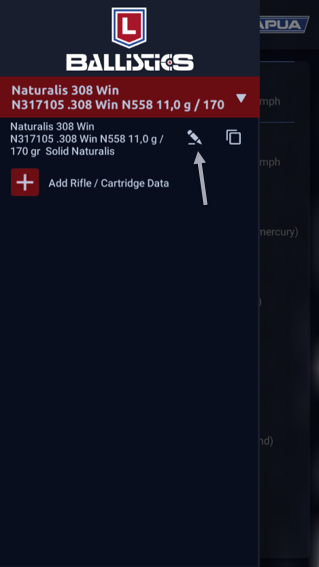
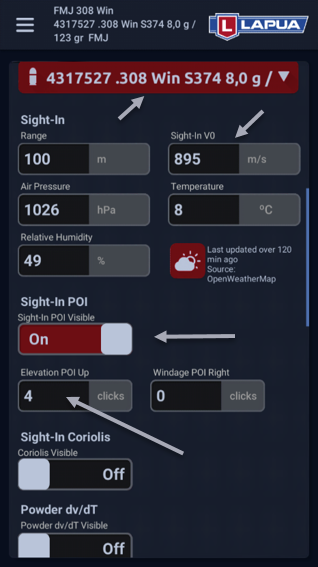
You want to use the Lapua Naturalis cartridge with the N558 bullet as the primary profile and create a parallel profile in the same rifle using the 8g FMJ (S374) bullet. àCopy the Naturalis profile and start updating the copied profile with the FMJ cartridge data. When sighting-in, the FMJ cartridge shot group hits the target 4cm above the point of aim.
  • Select Manage Rifle / Cartridge Data from the menu, activate the Sight-In POI feature, enter the value 4 in the Elevation POI Up column (in the example case, the sight-in distance is 100m and the scope click setting 1cm / 100m). Save the profile after changing the settings.
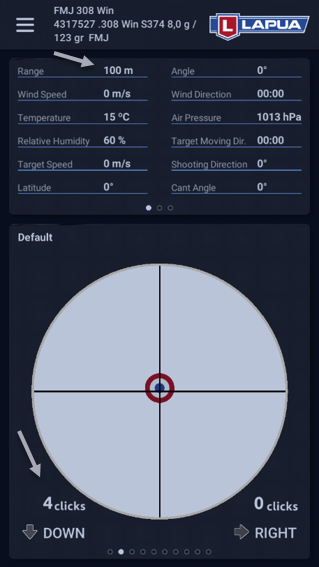
  • In the Calculator view for a shooting distance of 100m, the needed correction indicated by the calculator should now be ↓ 4 clicks, and in the crosshair view, the point of impact for the shot group should be slightly above the center grid.

Good to know about the Sight–in poi feature

  • When using the Sight-In POI feature, the sight-in distances don’t have to be the same for all cartridges (for the sake of clarity, the same distance was used in the previous example).
  • The PBR sight-in presented in the previous Lapua Ballistics Tip can also be entered into the rifle profile with the Sight-In POI feature, example: The optimal sight-in distance for a cartridge is 170m but you only have a 100m shooting range. Sight-in the rifle at 100m so that the hits are approx. 5 cm above the point of aim. Enter a sight-in distance of 100m in the rifle profile and 5 clicks in the Sight-In POI Elevation window.
  • If the scope doesn’t have resettable turrets, mark the zero points of the primary cartridge with something, eg. a sticker.
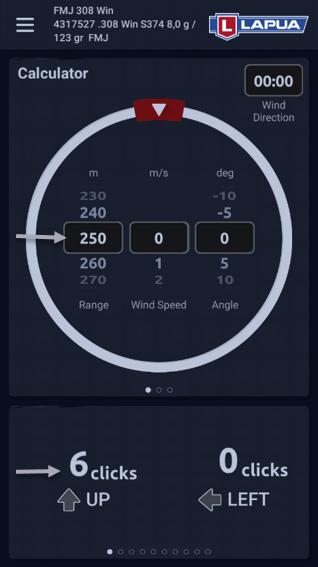
  • When the Sight-In POI feature is activated in the profile, it is easiest to make sight corrections using the clicks no matter what the shooting distance. Example using the previously created 8g FMJ bullet profile: When shooting at 250m, an increase of 6 clicks is required.
  • The Sight-In POI feature is available for Lapua products and Custom profiles.

Category

Products

News

Lapua’s Luke Johnson talks rimfire on The Shooter’s Mindset

All news

Lapua’s Luke Johnson talks rimfire on The Shooter’s Mindset

Lapua’s Rimfire Performance Center East Manger, Luke Johnson, visited The Shooter’s Mindset on Tuesday, June 9 to guide listeners into the world of rimfire ammunition performance testing. In this hour-long podcast episode, “The Shooter’s Mindset” hosts, Anthony Cruz, Jennifer Seymour and Greg Cannon, covered all aspects of rimfire performance testing with Johnson. Johnson dove deep into the […]

Lapua’s Rimfire Performance Center East Manger, Luke Johnson, visited The Shooter’s Mindset on Tuesday, June 9 to guide listeners into the world of rimfire ammunition performance testing. In this hour-long podcast episode, “The Shooter’s Mindset” hosts, Anthony Cruz, Jennifer Seymour and Greg Cannon, covered all aspects of rimfire performance testing with Johnson. Johnson dove deep into the testing process, the importance of ammo testing, how to best identify good groups, and the benefit of having multiple lots of ammunition while shooting competitively.

Category

Products Sport shooting

News